I Thought Codex Pets Were Stupid. Then I Built Maverick.
I’ll be honest.
When I first heard about Codex Pets, I thought they were stupid. I didn’t know what they did and I didn’t care.
As far as I was concerned, they were one more digital distraction in a world already obsessed with digital distractions.
My computer already has enough flashing, bouncing, ringing, chirping things demanding my attention.
Did I really need a tiny animated creature wandering around my desktop?
No.
Absolutely not.
At least, that's what I thought before curiosity got the better of me.
What on Earth Is a Codex Pet?
One afternoon, as I explored the Codex interface, I found where they hid Pets, tucked away in the settings, waiting patiently for someone like me to stumble across them.
I looked through the stock options and found myself asking two questions:
What exactly is a Codex Pet?
Why on earth would anyone want one?
The only way to answer those questions was to try one. So I did.
I selected the original "Codex companion" - a little robotic dude - woke the little critter up, and went back to work.
At first, it appeared to confirm everything I already believed.
Just another stupid distraction, sitting in the corner of my screen.
Cute? Sure.
Necessary? Not even a little bit.
So I went back to work. I set Codex to work on a new task, and...
The pet changed.
It moved differently while the work was being processed. It let me know when Codex needed something from me. It notified me when the task was finished.
That's the moment the light bulb went off.
The pet wasn’t just sitting there looking cute, it was giving me information.
Without another notification window.
Without another annoying sound.
Without forcing me to keep checking the main Codex window to see what was happening.
That made sense, so I researched Pets a little deeper.
Turns out that Codex pets can visually represent four basic conditions:
Running: Codex is actively working.
Needs input: Codex needs an answer, approval, or decision.
Ready: The work is finished and waiting for you.
Blocked: Something failed or encountered a problem.
The desktop version can also provide floating controls for starting a quick conversation and following activity across your chats.
So, not stupid at all.
Now, activating a Codex Pet does not make the artificial intelligence smarter. It doesn't improve the model you're using either.
And it doesn't secretly perform extra work behind the scenes without being asked.
It gives you a simple visual connection to the work that's already happening inside CODEX.
That may sound like a small distinction.
It wasn’t small to me.
The Search for a Pet That Felt Like Mine
Once I understood what these little critters could do, my opinion began to shift.
I still didn’t want a random animated critter sitting on my desktop, but I saw the value of having the right character sitting there.
So I did what any curious person would do.
I searched the web. I wanted to know whether other people were creating free Codex Pets and making them available to the public.
They were, and I found some interesting options.
Some were funny. Some were clever. Some were beautifully designed by people with far more artistic talent than I'll ever possess.
But none of them spoke to me.
They were somebody else’s pets, somebody else’s characters, somebody else’s idea of what should be sitting beside them while they worked.
None of them belonged to me or to Wolf Pack Mentors.
That's when I remembered Maverick.
We Already Had a Wolf
Deana has a little stuffed wolf pup. He's a fuzzy little critter with a surprising amount of personality for a fabric and stuffing creation.
A few years ago, we decided he needed a name.
Instead of choosing one ourselves, we turned it into a contest. People submitted their suggestions, we considered the options, and drew a prize for the winner.
Deana's little stuffed wolf pup became Maverick. It was AWESOME.
Over the years, Maverick became part of the collection of stories, symbols, and memories that make up our lives.
Then it struck me.
I wasn’t looking for a mascot.
We already had one.
And I thought, "What if I could take that history, personality, and emotional connection and translate it into a digital working companion?"
What if Maverick could sit beside me while I worked in Codex? Not as a generic cartoon wolf or some ridiculous animal wearing a business suit, and definitely not some marketing character covered in Wolf Pack Mentors logos.
As Maverick; a calm, observant, capable wolf who watches the work, signals when something needs my attention, and stays beside me until the job is finished.
That made sense to me.
What I Wanted Maverick to Represent
Once I decided to create him, I had to determine who digital Maverick would be.
He needed to be unmistakably a wolf. Not a dog, not a puppy, not a cartoon character with human arms, and definitely not a furry person.
He needed the gray, silver, charcoal, cream, and white coat associated with The Wolf Pack Mentors wolf.
He needed upright ears, a full natural tail, a strong but believable build, and those distinctive green eyes.
But his appearance was only half the job.
Maverick needed a personality.
Calm. Intelligent. Observant. Quietly confident. Persistent. Loyal. Occasionally playful, but never hyperactive.
He wasn’t supposed to bounce around like an overcaffeinated cheerleader.
He was supposed to communicate something much simpler:
I’m here. I’m paying attention. Let’s figure this out and keep moving.
In other words, Maverick needed to embody the operating philosophy behind Wolf Pack Mentors:
Clarity. Structure. Accountability. Execution.
That gave me more than a visual design. It gave me a character to create.
Creating Maverick Was Not a One-Click Adventure
This is where the story becomes slightly less magical.
I assumed creating Maverick would be a relatively simple project.
Describe the wolf. Supply the reference image. Generate the animations. Package the files.
Done.
I figured 15 or 20 minutes, tops.
I was wrong. So very wrong.
The first approach produced ugly visual contamination around the edges of the wolf.
Some animation frames needed to be regenerated. One directional running animation produced hideous fragments. Another source became corrupted. Background colours bled into parts of the fur.
Every time I corrected one problem, another one eagerly introduced itself. Just like in business.
What should have been a contained creative project consumed two and a half hours of my time and more than ten percent of my weekly Codex usage.
For one pet.
That was absurd. And I told CODEX so.
But it also taught me something really important.
A detailed creative brief is not the same thing as a controlled production plan.
I had described Maverick thoroughly. I knew how he should look, move, and behave.
What I didn't establish were limits on the AI process.
There was no maximum number of regeneration attempts.
There was no checkpoint after creating the base character.
There was no requirement to test one representative animation before producing the entire set.
There was no time limit or compute budget.
The process was free to keep chasing perfection, as AI is wont to do.
So it did.
If I were starting over, I would handle the process very differently.
I would approve the base character first.
Then I would create one animation and confirm that the visual style, transparency, movement, and anatomy worked properly.
Only then would I authorize the remaining animations.
I would permit one regeneration attempt per animation. If the same technical defect appeared across several states, I would stop production and diagnose the underlying problem before spending another token.
That lesson applies to so much more than creating digital pets.
A clear destination matters. So do guardrails.
How to Create Your Own Codex Pet
If you want to create a pet of your own, begin with something meaningful.
Don't start with:
Make me a cool pet.
That leaves every important decision to the machine. Instead, think about the character before thinking about the animation.
Your pet might be based on:
an animal that's been part of your family;
an existing business mascot;
a character from one of your books;
an original piece of artwork;
a meaningful symbol; or
an animal whose personality reflects the way you work.
Then define the identity.
What is the pet’s name?
What species or type of character is it?
What features make it immediately recognizable?
How should it behave?
What should never change between animations?
What do you absolutely not want it to become?
Once you know those answers, create a bounded brief.
Here is a simplified starting point:
Create a custom Codex Pet named [NAME].
The pet is [CHARACTER OR SPECIES].
Use [REFERENCE IMAGE OR DESCRIPTION] as the primary identity reference.
Its defining features are [LIST THE IMPORTANT FEATURES].
Its personality is [DESCRIBE THE PERSONALITY].
Use a [DESCRIBE THE VISUAL STYLE] style that remains readable at a small desktop size.
Do not make it [LIST YOUR EXCLUSIONS].
Before producing every animation, create and validate the base character and one representative animation. Stop and ask for approval before continuing.
Permit no more than one regeneration attempt per animation without additional approval.
That last part may not sound very creative to you.
Include it anyway because creativity needs room to work, but it also needs a fence around the property.
You don't let your real-life dog run wild around the neighborhood. Don't let your AI do it either.
Using the Built-In Pet Workflow
If custom Pets are available in your version of the desktop app, the basic creation process is straightforward:
Open Settings > Pets.
Select Create pet.
Describe the pet you want.
Provide a reference image if you have one.
Let the pet-creation workflow generate and validate the files.
Return to Settings > Pets.
Select Refresh.
Choose your new pet.
Enter
/petor select Show pet from the command menu. Availability may depend on your app version, account, and workspace settings.
Once your pet is active, review it at the size you will actually use.
A beautiful face viewed at full resolution may become an unrecognizable blob when reduced to desktop-pet size.
Look at the silhouette.
Check the face.
Watch the movement.
Make sure the defining colors and physical features are still visible.
The goal is not produce an impressive animation sheet.
The goal is to recognize your companion when it is working beside you.
Now, let me get back to the story...
Meet the Finished Maverick
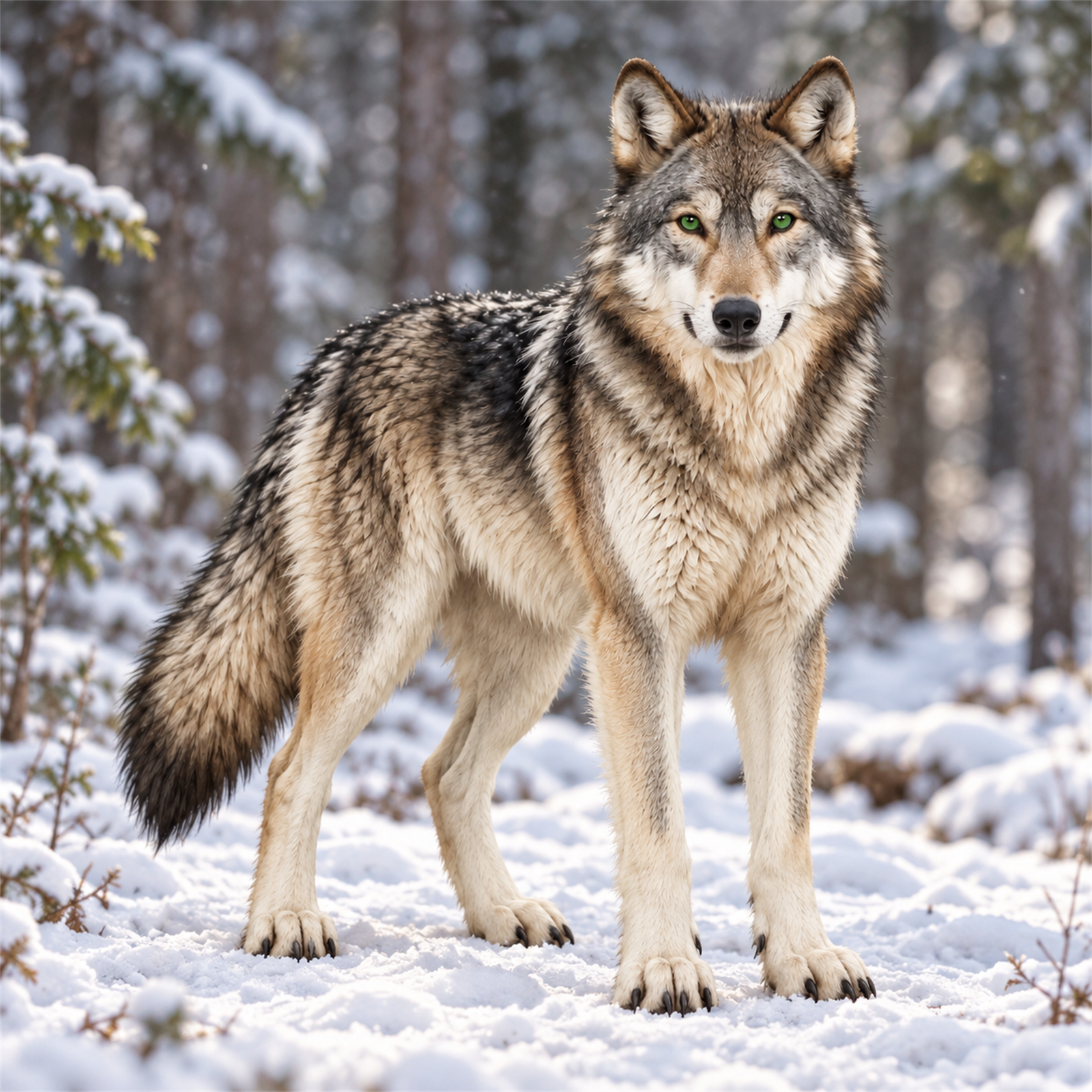
After all the generation, regeneration, background removal, extraction, assembly, frustration, and testing, Maverick finally emerged, and he's awesome.
He has nine animation states.
He can stand calmly while idle, run with purpose, offer a wolf-style greeting, wait attentively, review the work, and react when something goes wrong.
He's not perfect. No generated character is.
But when I look at him, I don't see a random digital wolf.
I see Maverick.
And that was always the goal.
Want Maverick Working Beside You?
If you would like Maverick working beside you in your own Codex environment, download the finished pet here:
You don't need the pet-creation skill. You don't need image-generation access. You don't need to regenerate any of the artwork or animations.
Just download the package, follow the included installation instructions, refresh your Pets menu, and select Maverick.
That's all there is to it.
This Is Not a Marketing Gimmick
Let me make one thing perfectly clear.
Maverick is not a sales funnel.
He's not a lead magnet wearing fur.
There are no Wolf Pack Mentors calls to action buried inside him.
He will not interrupt your work to sell you something. He will not collect information. He will not suddenly suggest that you book a consultation with Deana and me.
He is something I created, found useful, and decided to share with you.
That’s it. That's all. [say it in Arnold's accent. Maybe it will ring a bell.]
Maverick is a small working companion that made my Codex environment more personal, more useful, and—yes—a little more enjoyable.
I built him for myself, mostly as an exercise to see if I could build a Codex Pet.
Then I decided the Wolf Pack should have him too.
Download him. Put him to work.
And if you decide to create a Codex Pet of your own, I would love to know what character, animal, or symbol you choose.
Because that may be the best part of these supposedly stupid digital pets.
They give us another way to bring a little piece of our story into the work we do every day.


